CERTivity® KeyStores Manager
Overview
CERTivity® is a powerful pure Java multi-platform visual KeyStores manager. This standalone GUI desktop application provides a natural experience for managing and using KeyStores, Certificates, Key Pairs (Private Key, Certificates Chain), Secret Keys in various formats. Constantly extra features are added besides covering and combining functions that otherwise are dispersed under verbose command line and operating system tools or browsers. CERTivity is not intended to be a 1:1 replacement of these tools – the features being combined and centralized in an intuitive and productive organization.
Thus developers and system administrator can gain valuable time and ensure the greatest productivity by letting CERTivity taking care of the low level details in a uniform manner on almost all the systems – Windows, Unix/Linux, Mac.
See below what makes CERTivity stands out:
JRE CA KeyStores detection and easy management
It can discover and open the machine's JRE CA TrustStore(s) searching for the TrustStores in locations covering most of the known JVM locations on different operating systems such as Windows, Mac or Unix;
JCE Unlimited Strength Jurisdiction Policy Files installation
The Java Cryptography Extension (JCE) Unlimited Strength Jurisdiction Policy Files are sensitive to country import restrictions and CERTivity is not allowed to bundle them. To compensate this, for the entitled users, CERTivity features an intuitive installation from the Oracle JDK website via the JavaFX browser.
Support for Elliptic Curve algorithms
As Elliptic Curves offers the same cryptographic power at smaller key sizes they slowly get more attention for this efficiency. CERTivity helps one exploring this domain by offering EC(DSA)/ECGOST3410 capabilities with tens of parameter specifications.
Marking RSA Keys which are less than the minimum size alowed
CERTivity marks the existing Certificates and Key Pairs which have RSA keys less than the allowed minimum size and allows the user to set a custom minimum key size limit; this custom limit is also taken into consideration when generating a new Key Pair, a warning being displayed if a lower key size is given by the user;
Display validity status for Key Pairs and Certificates in the KeyStore view
It displays information about the validity status of Key Pairs and Certificates emphasizing the ones which are expired, or about to expire. The “About to expire” period is configurable and it means that the Certificate or Key Pair will expire in the given number of days from the current date;
Display trust status for Certificates in the KeyStore view
It displays easy to see information in a dedicated column about the trust status of a certificate entry from the KeyStore, depending on the possibility to establish a trust path for that certificate using the available TrustStores; the possible displayed values are “Trusted”, “Not Trusted” or “N/A” if no TrustStores have been set yet;
Generating new Key Pairs from old Key Pair content
The user has the possibility to generate a new Key Pair having the Key Pair generation dialog fields filled up with the keys and certificate information (keys algorithm, keys size, certificate version, signature, distinguished name, etc.) from an existing Key Pair; These values are editable and the user can modify them to fit his needs;
Windows KeyStores Management
CERTivity offers the possibility to open, view and work with Microsoft Windows KeyStores in a similar easy way as it does with the other supported KeyStore types. It can open both the Root KeyStore and the User KeyStore on Microsoft Windows systems;
Simple management of certificate extensions
It facilitates adding of extensions to certificates when generating Key Pairs and CA Reply Certificates using an easy to use tree-like structure for adding and representing the extensions, plus real-time validation of the extensions structure and user input at creation time;
Configurable KeyStore persistence on successive runs of the application
The user can configure the application to remember the KeyStores which were not closed before exiting the application together with their passwords so that they can be reopened automatically on the next run, or to remember only the KeyStores without passwords so that the user to be prompted to enter the passwords for them on the next run;
Import SSL Certificates
It can import SSL certificates from servers using an easy to use certificate retriever dialog with automatic parsing of host and port for given URLs; the parsed host and port are put into separate fields which can be further edited by the user if desired; it can import the retrieved certificates directly into the active KeyStore;
Get revocation status
It facilitates obtaining revocation status for a given certificate using either the information from the certificate extensions, using a Certificate Revocation List (CRL) file which the user can provide, or using a Certificate Revocation List URL which may hold revocation information about the given certificate;
Test SSL protocols
It can use SSL certificates against a text protocol over SSL to send requests and receive responses (e.g. a web service, SMTP, direct XML over TCP/IP) – both server side and client side certificates/Key Pairs can be configured;
Extend validity period of expired self-signed Key Pairs
Using CERTivity, the validity period for self-signed certificates can be extend easily; the user only needs to specify the new expiration date instead of creating a new Key Pair from scratch, making the operation of obtaining a new valid certificate trivial;
File signing made easy
It can sign JAR, APK, PDF and XML files easily and directly using a Key Pair from one of the currently opened keystores, having many signature and digests algorithms available;
PDF Signing
Supports all the SubFilter values (according to the PDF reference, version 1.7) when signing and verifying PDF documents: "adbe.x509.rsa_sha1", "adbe.pkcs7.detached", "adbe.pkcs7.sha1";
Import Certificates to KeyStores directly from the signature verification results dialog
The user can easily import the certificates found in the signature of a JAR, APK, PDF or XML file into the active KeyStore (the active top component), directly from the verification results panels of the verify JAR, PDF and XML actions by simply selecting one of the signature certificate and pressing the “Import To KeyStore” button;
TrustStores Management
Allows easy adding and removing of the TrustStores needed for establishing trust and offers useful options for trust path validation (like certificate path maximum length, custom validation date, revocation checking, etc.); the available TrustStores can be set by the user who can choose either from the known ones (the JRE CA TrustStores or Windows TrustStores), or custom TrustStores;
Certificate signing made easier
It decreases the number of steps needed when signing a certificate; it offers the possibility to sign a certificate using a previously set CA Issuer, by combining the required operations needed in the process of signing a certificate (generating a Certificate Signing Request (CSR) for the certificate which needs to be signed, signing the CSR by the CA Issuer, importing the CA Reply), making certificate signing faster and easier.
Screenshots
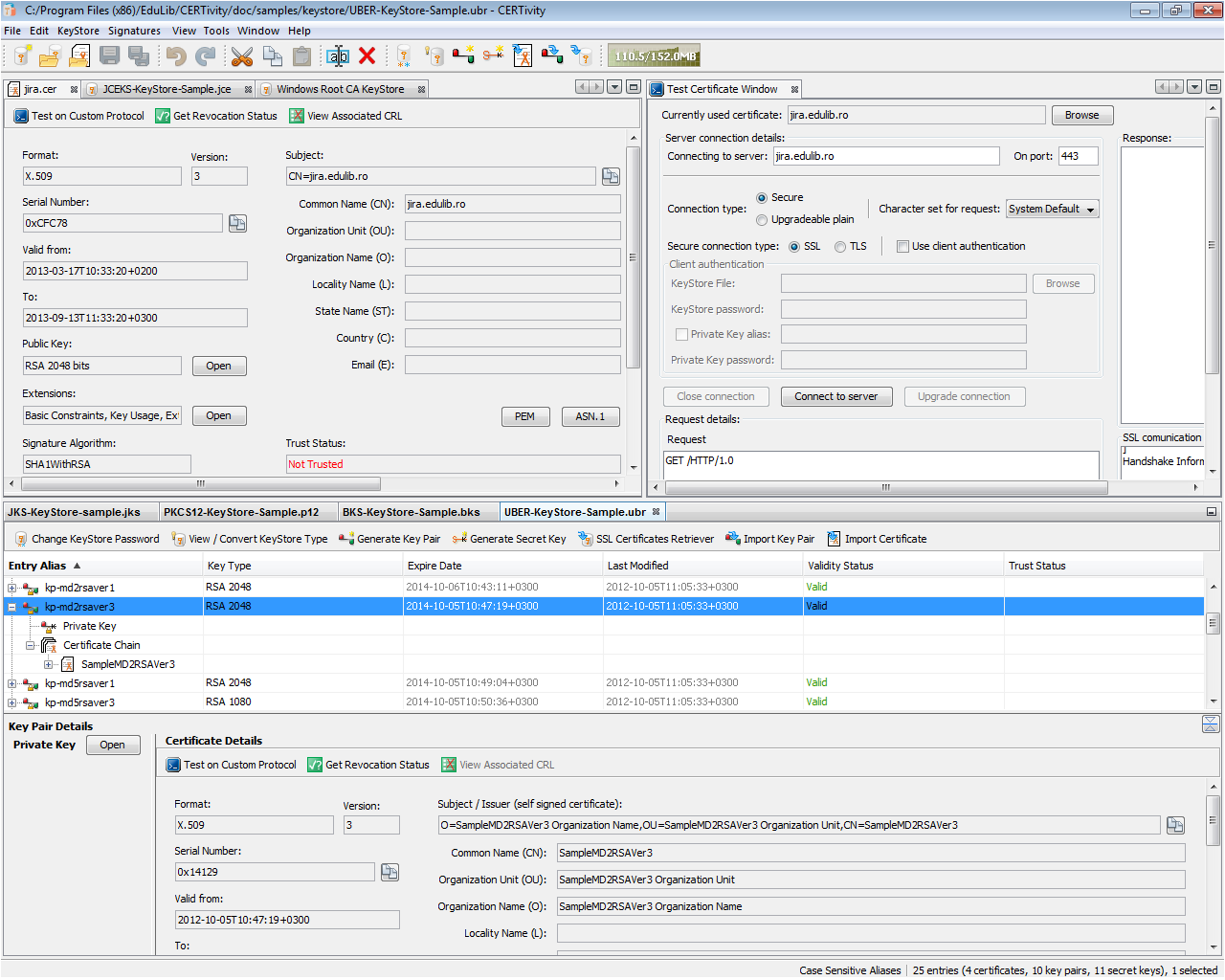
CERTivity IDE
CERTivity is seen at its full power, having many KeyStores of different types opened, a Certificate panel displaying the details of a certificate and a panel for testing a certificate on a custom raw text protocol.
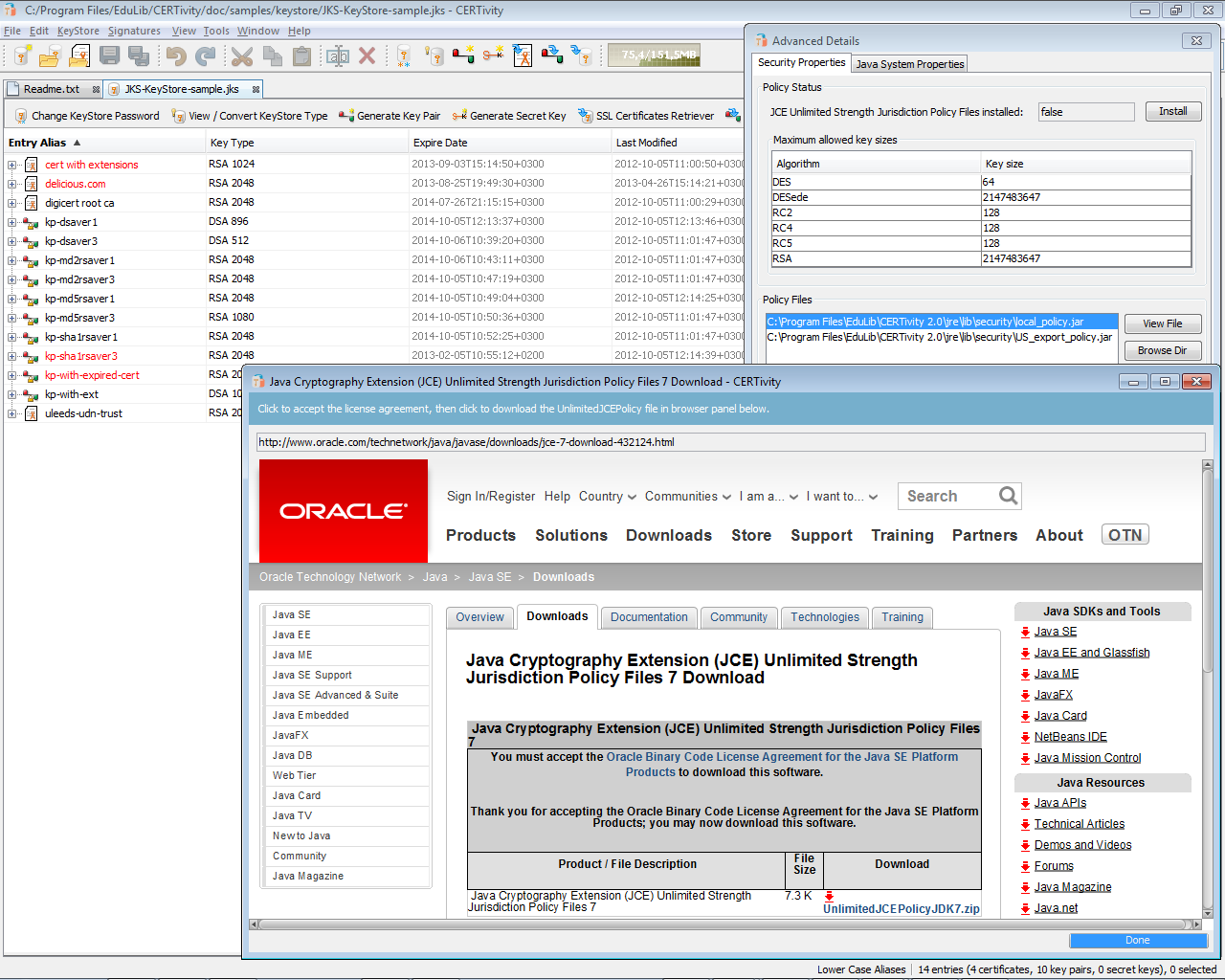
JCE Unlimited Strength Jurisdiction Policy Files installation
CERTivity provides a simple installation, from the Oracle JDK website via an integrated JavaFX browser, of the Java Cryptography Extension (JCE) Unlimited Strength Jurisdiction Policy Files. Only the users located in countries with no import restrictions should use these Oracle files. The user is simply performing the actions s(he) performs in the browser, accepting the Oracle License Agreement and clicking the download link. After the download finishes CERTivity will automatically install the files in the necessary JRE location on disk, backing up the standard files.
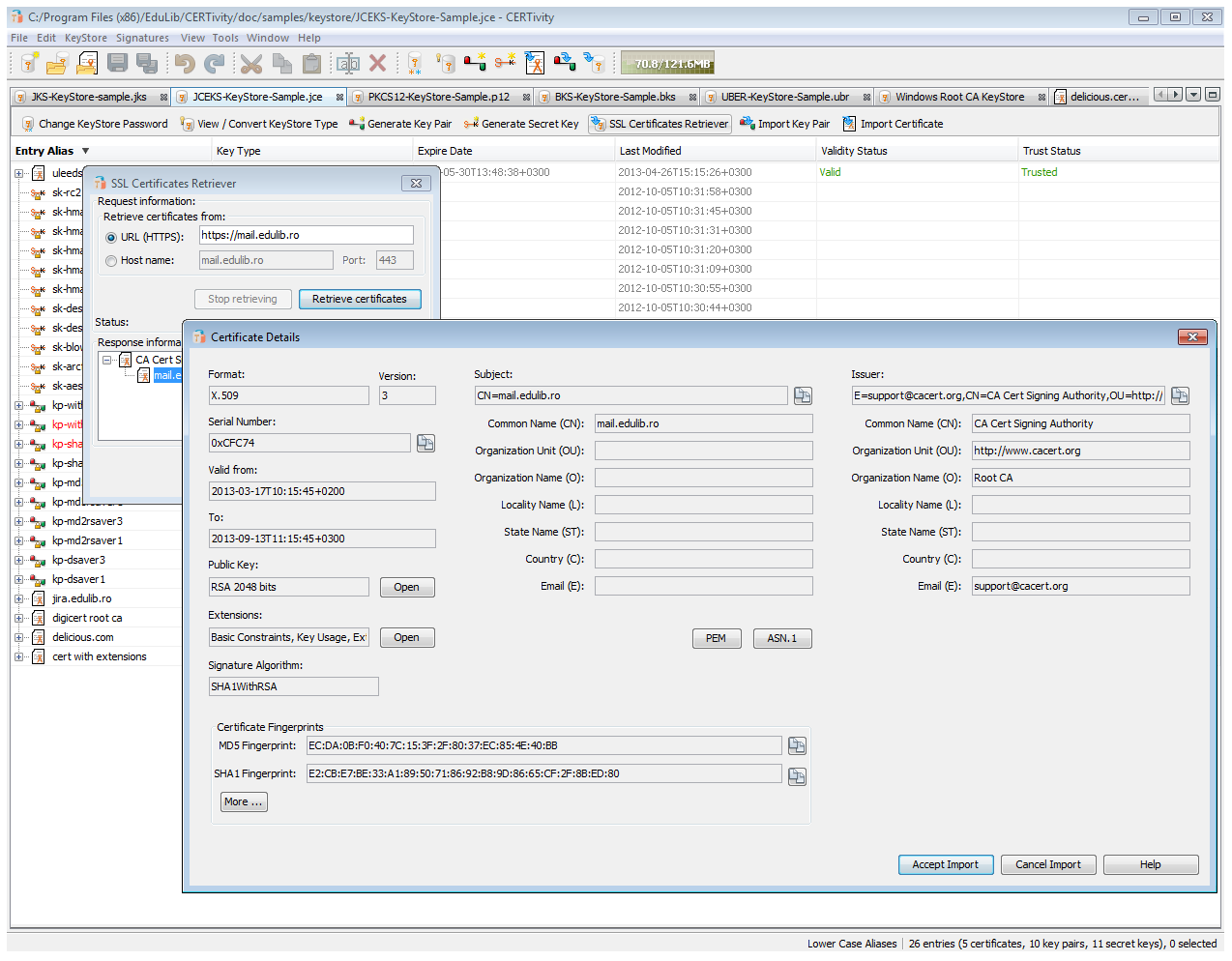
CERTivity Import SSL
How SSL certificates can be obtained from a given server analyzed and then either imported into the current KeyStore, or exported to a file. Here we can see the details of the certificates available through the View Details button. Any certificate from the certificate hierarchy can be analyzed, imported in the current KeyStore or exported to a file as a standalone certificate in various formats: X.509 (with/without PEM encryption), PKCS #7 (with/without PEM encryption), PKI Path.
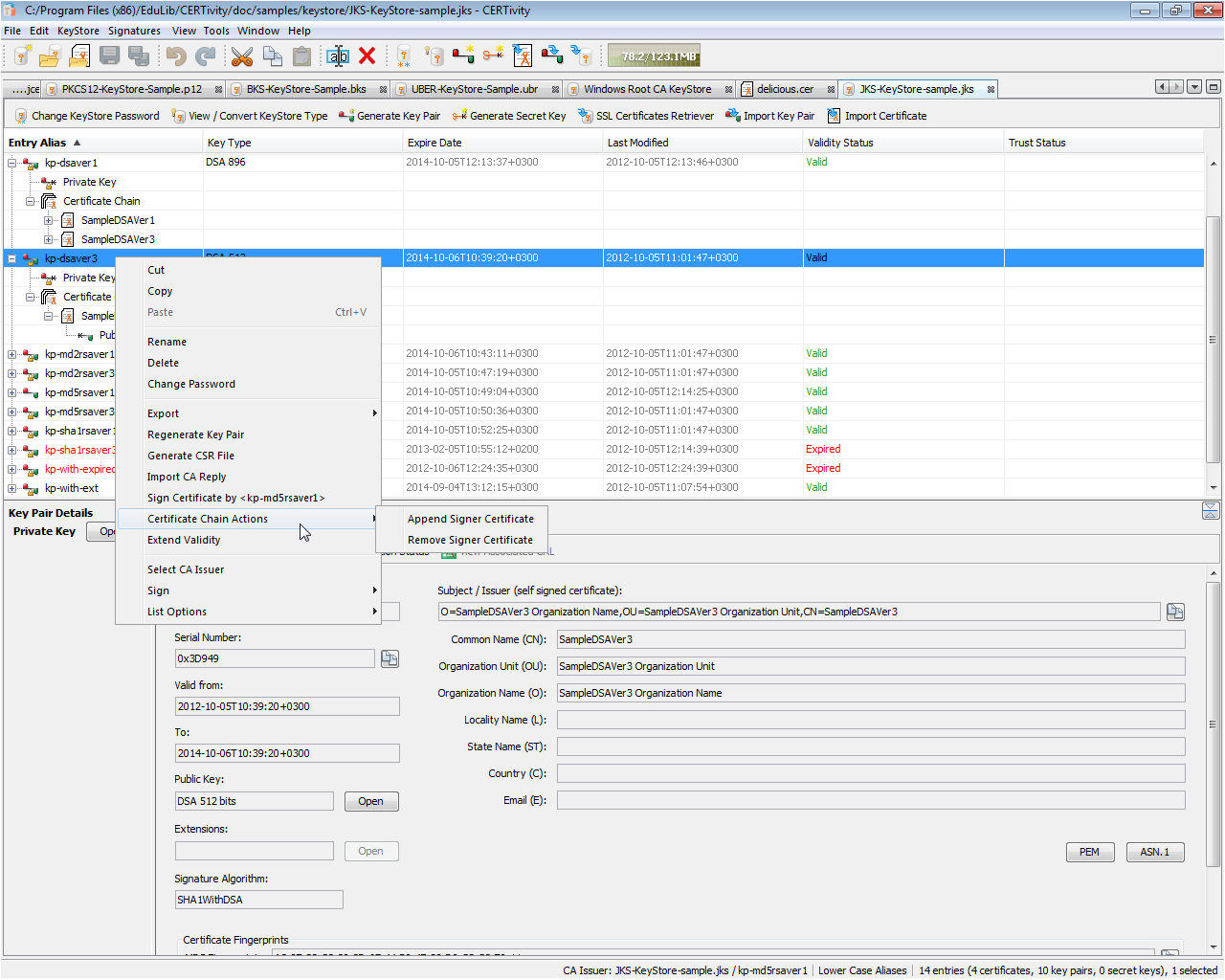
CERTivity KeyStore Opened
CERTivity displaying multiple KeyStore types, having the first KeyStore active, and one Key Pair entry selected for which details are shown in the bottom panel. The KeyStore is represented in a Tree fashion. Also, most of the entries of the KeyStore can be seen expanded, showing their inner components (Private Key, Certificate Chain, Certificates, Public Key) as well as providing a contextual menu.
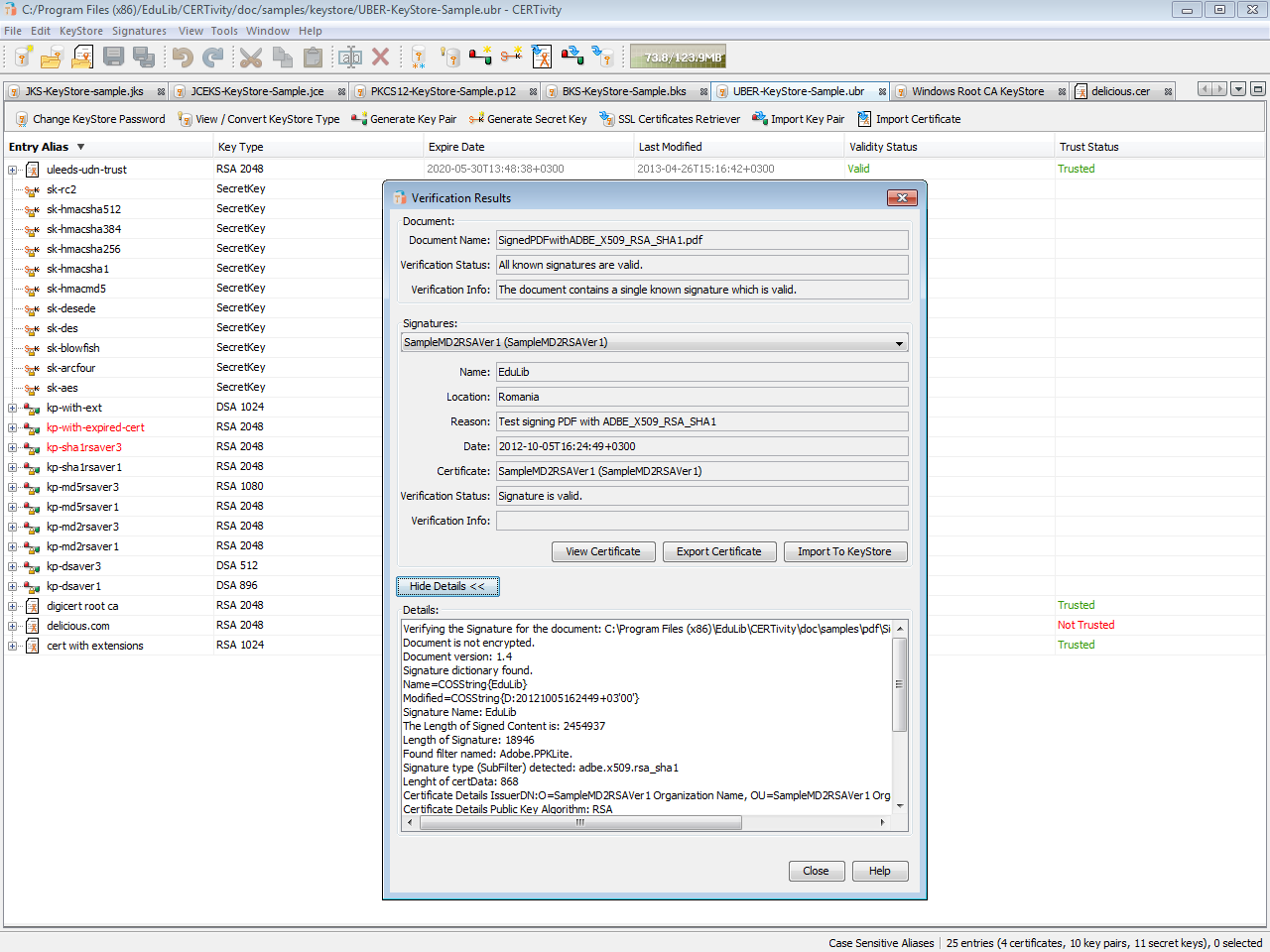
CERTivity Verify PDF
The PDF verification results dialog, showing the verification status and additional details about a PDF document and its signatures and embedded certificates. The certificates associated with the signatures can be viewed and exported as standalone certificates files in various formats. Valuable information such as the SubFilter type or the reason why the signature is or is not valid are presented. For example, depending on the SubFiter type, there may be two digests to be verified, and if one of these fails the validation fails, and this could be visible by inspecting the Details section - such details are not usually available through the PDF Readers.
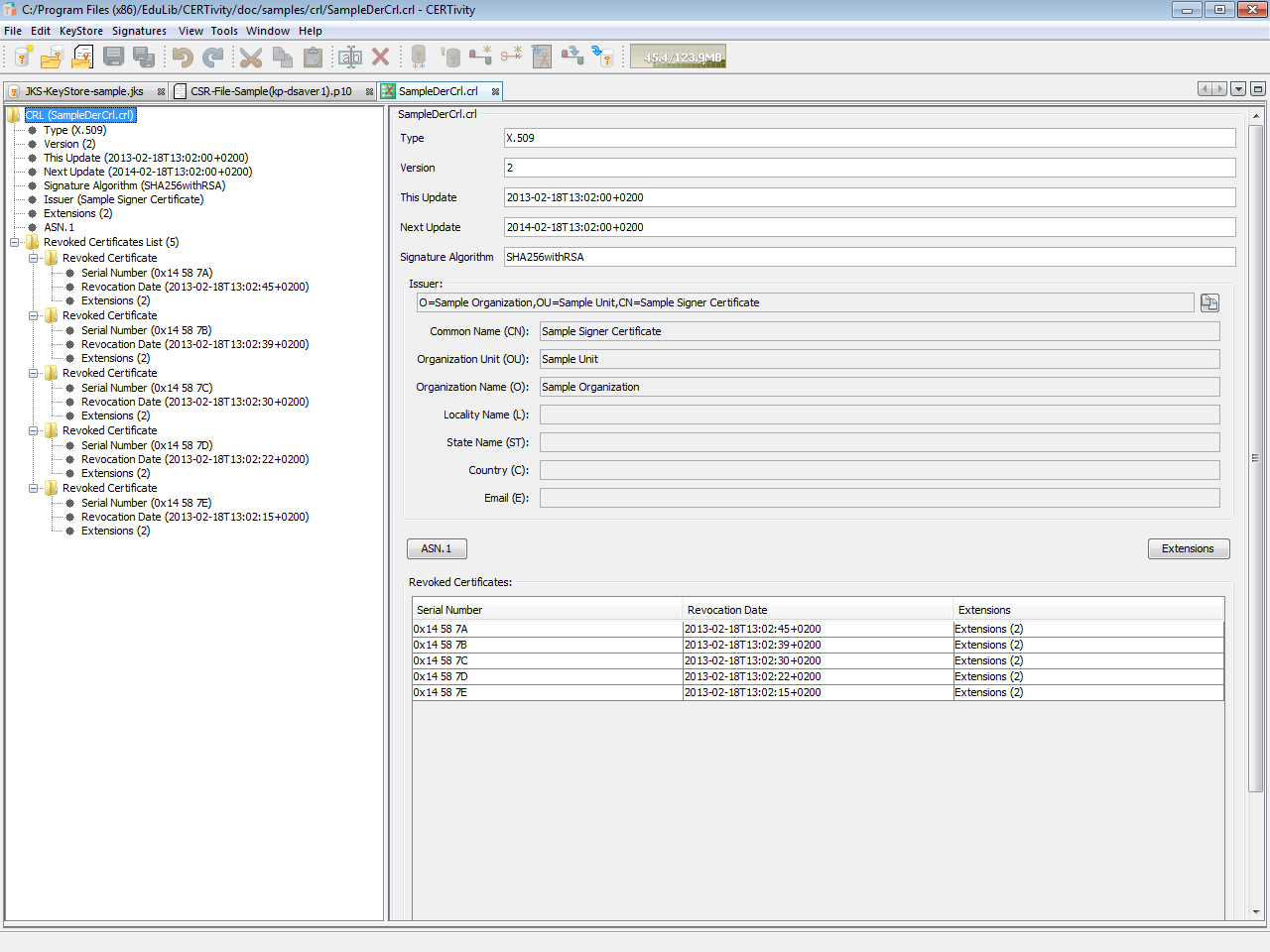
CERTivity CRL View
CERTivity displaying a KeyStore, a CSR file and having active the tab where a CRL sample file is displayed as follows: the fields of the CRL file are displayed in the left part of the application window using a tree structure and the content of the CRL fields or tree node selected is displayed in the right part of the application window. The revoked certificates entries can be viewed individually by clicking on each revoked certificate node, or they can be displayed as a list, by selecting the Revoked Certificates List.
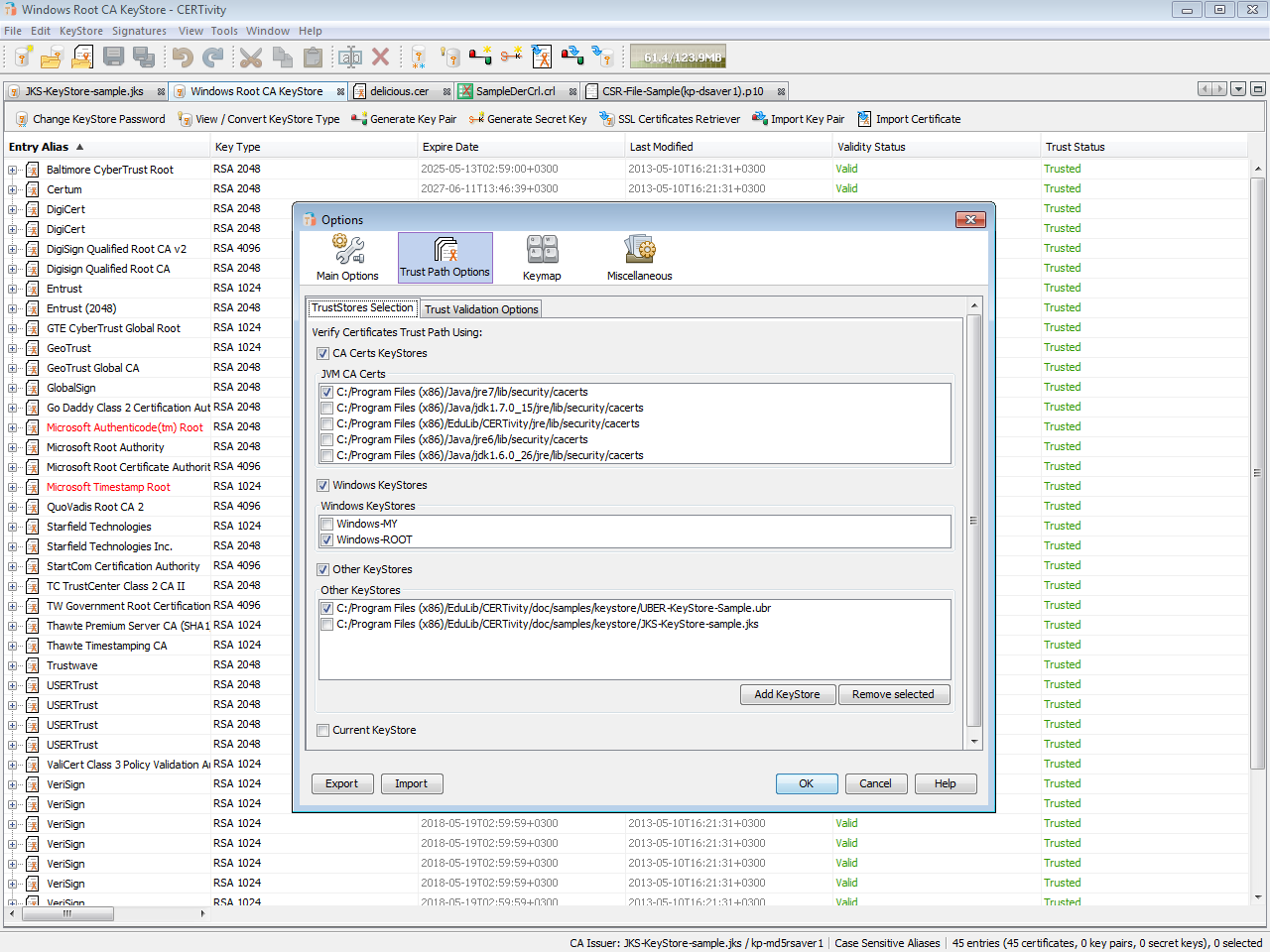
CERTivity TrustPath Settings
The Options dialog, showing the settings contained in the "Trust Path Options / TrustStores Selection" tab. The "Trust Path Options" allows dynamic TrustStore management at runtime. This new option contains two tabs called "TrustStores Selection" and "Trust Validation Options", these tabs containing in turn new options for setting the active TrustStores and validation parameters.
Try
A CERTivity 2.0 Free License Key (File) will be sent to your e-mail address and to your browser via the form below.
Make sure your e-mail address is correctly filled in and check your spam folders in case is not does not reach the inbox.
Your e-mail is never published nor shared. Required fields are marked *.
Once you received a License Key (File), please download and try CERTivity® KeyStores Manager.
Download
Download CERTivity® KeyStores Manager 2.0 installation packages:
1. Download the appropriate installation package for a fully functional product depending on the platform where you want to install CERTivity. Use MD5 checksums to establish the data integrity of the installation packages that you download;
Build date: 2017.07.10 • Build number: 15 • Size: 85.5 MB
JRE: windows-x86-1.8.0_131 • Supported architectures: x86
Build date: 2017.07.10 • Build number: 15 • Size: 89.6 MB
JRE: windows-amd64-1.8.0_131 • Supported architectures: x64
Build date: 2017.07.10 • Build number: 15 • Size: 50.1 MB
2. Run the installation package and follow the on screen instructions. Please check CERTivity® System requirements and, for more detail, the CERTivity®‘s Administrative Details chapter of the manual for installation instructions.
3. When you first run CERTivity, you will be asked to activate our product, use the free license you obtained from the license page.
Download CERTivity® KeyStores Manager Manual
Here you will find the CERTivity manual which you can either read on line or download. Because the file is in PDF format, you will require the Adobe® Reader® to be able to view it.
 CERTivity.pdf
CERTivity® System requirements
CERTivity being a GUI desktop application it requires a Graphical Interface to install and run.
The minimum and recommended hardware configurations are depicted in the table below:
| Minimum Configuration | Recommended Configuration |
|---|---|
| Processor: 800 MHz Intel Pentium III or equivalent | Processor: 2.6 GHz Intel Pentium IV or equivalent |
| Memory: 512 MB | Memory: 2 GB |
| Disk space: 250 MB of free disk space | Disk space: 400 MB of free disk space |